
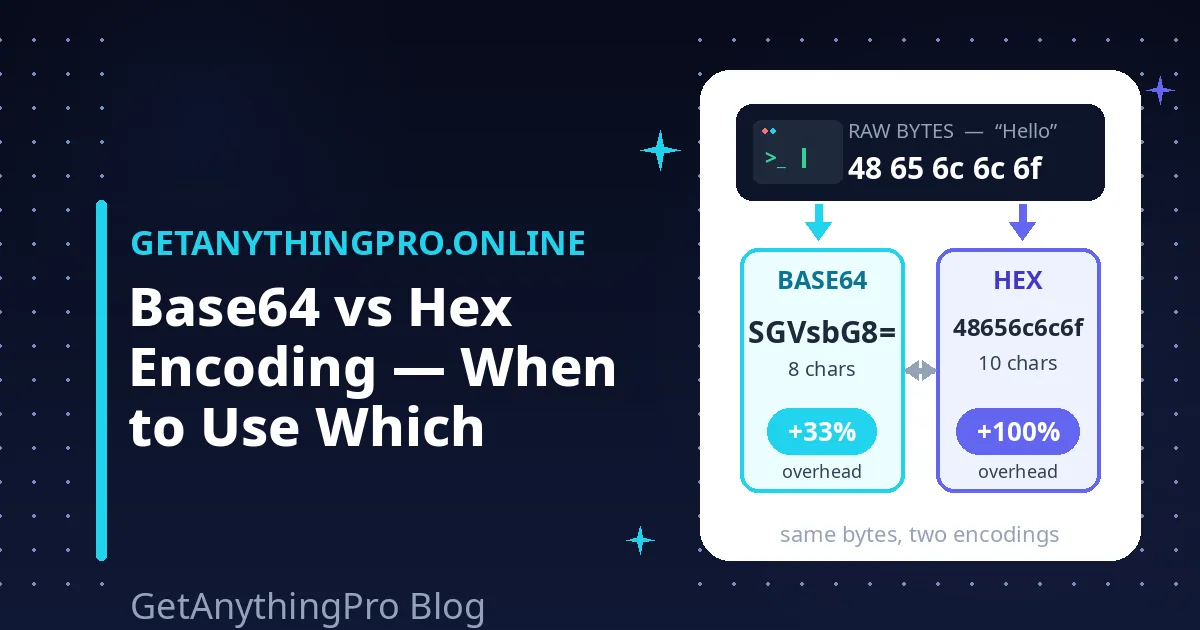
If you have ever stared at a blob like SGVsbG8= next to another like 48656c6c6f and wondered what you were looking at, you have met the two most common ways of writing raw bytes as text. The base64 vs hex encoding difference comes down to a single tradeoff: how many text characters you spend to represent each byte of data. Hex spends two characters per byte (100% overhead); Base64 packs more data into every character and spends only about 1.33 characters per byte (roughly 33% overhead).
Table of Contents
- The Base64 vs Hex Encoding Difference in 30 Seconds
- Same Bytes, Two Encodings: Worked Examples
- The Overhead Math: Why ~33% vs 100%
- Try It: Encode the Same Text Both Ways
- Where You’ll Meet Each: The Field Map
- Why Are Hashes Shown in Hex but JWTs in Base64?
- Mistakes to Avoid
- Frequently Asked Questions
Neither one is encryption — both are just translations that make binary data safe to paste into text. This post works through the exact same bytes shown in both encodings, does the overhead math without hand-waving, and maps out where you will actually meet each one in the wild. After this, the base64 vs hex encoding question will feel like second nature.
The Base64 vs Hex Encoding Difference in 30 Seconds
Both encodings solve the same problem: binary data (bytes with values 0–255) cannot travel safely through systems built for text. Email bodies, JSON payloads, URLs, and source code all assume text, so bytes get “encoded” into characters that survive the trip. The two encodings differ only in the alphabet they use:
| Hex (base16) | Base64 | |
|---|---|---|
| Alphabet | 16 characters: 0–9, a–f | 64 characters: A–Z, a–z, 0–9, +, / (plus = padding) |
| Bits carried per character | 4 | 6 |
| Characters per byte | 2 | ≈1.33 |
| Size overhead | 100% — output is exactly 2× the input | ≈33% — output is about 4/3 the input |
| Readability | Easy to scan byte by byte | Compact but opaque |
| Typical home | Hashes, key fingerprints, hex dumps | Data URIs, JWTs, email attachments |
The “base” in the name tells you the alphabet size: base16 (hex) uses 16 characters, base64 uses 64. A bigger alphabet means each character carries more information, so you need fewer characters overall. That is the entire difference — everything else in the base64 vs hex encoding comparison follows from it.
Same Bytes, Two Encodings: Worked Examples
The clearest way to feel the difference is to encode identical bytes both ways. Take the text “Hi” — the smallest possible base64 vs hex encoding demo. In UTF-8 that is two bytes: 0x48 0x69.
- Hex: each byte becomes two characters → 4869 (4 characters)
- Base64: the two bytes become three characters plus one padding character → SGk= (4 characters)
For tiny inputs the two look similar in length — the gap only shows as data grows. Scale up to “Hello” (5 bytes: 48 65 6c 6c 6f):
- Hex: 48656c6c6f — 10 characters, exactly 2× the bytes
- Base64: SGVsbG8= — 8 characters, 5 bytes × 4/3 rounded up
Now try bytes that are not text at all. Programmers love the test value 0xDE 0xAD 0xBE 0xEF (which spells “deadbeef” in hex):
- Hex: deadbeef — you can read each byte directly: DE, AD, BE, EF
- Base64: 3q2+7w== — shorter, but you cannot eyeball the individual bytes
That last example shows the real-world tradeoff. Hex lets you visually split output into bytes, which is useful when debugging protocols or comparing hashes. Base64 gives you shorter output, which is useful when size matters. If you want to experiment with your own values, a number base converter flips individual numbers between hex, decimal, binary, and other bases, and our Base64 encoder/decoder encodes any text so you can compare the results side by side. Running your own values through both encodings is the fastest way to internalize the base64 vs hex encoding tradeoff.
The Overhead Math: Why ~33% vs 100%
Here is the honest math behind the base64 vs hex encoding overhead. A byte holds 8 bits, and each character of an encoding carries log₂(alphabet size) bits:
- Hex: 16 characters = 4 bits per character. One byte (8 bits) needs 8/4 = 2 characters. Two characters of text for one byte of data = 100% overhead. Every time, no exceptions.
- Base64: 64 characters = 6 bits per character. Three bytes (24 bits) fit exactly into 24/6 = 4 characters. So 3 bytes → 4 characters, a ratio of 4/3 ≈ 1.333, i.e. about 33% overhead.
The = padding appears when the input length is not a multiple of 3: one leftover byte becomes two Base64 characters plus ==; two leftover bytes become three characters plus =. That is why “SGVsbG8=” (5 bytes) ends with a single = — padding adds at most 2 characters, so the overhead stays near 33% for any realistically sized input.
Put it in concrete terms for a 1 MB file: hex would balloon it to 2 MB of text; Base64 would produce roughly 1.33 MB. When you are embedding data inside a JSON field or a data URI, the base64 vs hex encoding size difference is exactly why Base64 usually wins.
Try It: Encode the Same Text Both Ways
Reading about encodings is one thing; watching your own bytes flip between the two is what makes it click. Paste any text into our Base64 encoder/decoder and watch the output length change as you add characters — count them and you will see the output stays close to 4/3 of the input size. Encode the word “Hello” and you will get SGVsbG8=, exactly matching the worked example above — a hands-on base64 vs hex encoding check you can repeat with any text.
Working with images instead of text? Our image to Base64 converter shows why Base64 is the standard for data URIs: it turns an image file into a text string you can paste straight into an src attribute. And if you want to inspect what hex looks like at the bit level, the number base converter converts between hex, decimal, binary, and other bases.
Where You’ll Meet Each: The Field Map
Hex territory
- Cryptographic hashes: SHA-256 digests are almost always shown as 64 hex characters. That is not a rule of cryptography — it is a convention, because hex makes every byte visible and easy to compare character by character.
- Keys and fingerprints: SSH key fingerprints, certificate thumbprints, and API key prefixes are usually hex for the same reason: humans (and diff tools) compare them visually.
- Low-level debugging: hex dumps and hex editors show bytes in hex because each byte maps to exactly two characters — there is never any ambiguity about where one byte ends and the next begins.
- Color codes: #FF5733 is three bytes written in hex. (Not strictly “encoding” in the data-transport sense, but the same alphabet at work.)
Base64 territory
- Data URIs: data:image/png;base64,iVBORw0… embeds an image directly in HTML or CSS. Hex would double the size; Base64 keeps it compact.
- JWTs: JSON Web Tokens join three Base64url-encoded segments with dots. The token travels inside HTTP headers on every request, so compactness matters.
- Email attachments: MIME’s Content-Transfer-Encoding uses Base64 to carry binary attachments through text-only mail infrastructure.
- Basic auth: the Authorization: Basic header is username:password in Base64 — obfuscated, emphatically not encrypted.
Why Are Hashes Shown in Hex but JWTs in Base64?
This is the base64 vs hex encoding question that makes the whole comparison click, and the answer is pure engineering pragmatism.
Hashes are shown in hex because humans read them. A SHA-256 digest is 32 bytes. When you compare two digests — checking a download against a published checksum, eyeballing a certificate fingerprint — you are scanning for differences. Hex gives you a clean 64-character string where each byte boundary is obvious, using only 0–9 and a–f, so there is nothing that confuses the eye or a terminal. The 100% size overhead does not matter because hashes are short: 64 characters is still one line — the clearest base64 vs hex encoding illustration of the rule that follows.
JWTs use Base64 because machines move them. A JWT payload can be hundreds of bytes, and it travels inside HTTP headers and URLs on every single request. At that size, hex’s 2× overhead is real bandwidth; Base64’s 4/3 is meaningfully cheaper. (JWTs use the URL-safe Base64 variant, which swaps + and / for – and _ and drops the padding, so tokens survive URLs unescaped.)
The rule of thumb: hex when a person inspects the value; Base64 when a system transports it. Hashes get eyeballed; tokens get transmitted. Memorize that line and you will answer any base64 vs hex encoding question correctly.
Mistakes to Avoid
1. Treating Base64 as encryption. This is the most common and most dangerous mistake. Base64 is a translation, not a lock — anyone can decode SGVsbG8= back to “Hello” in a second, with no key. If you need secrecy, encrypt first; you can then Base64-encode the encrypted bytes for transport, which is a legitimate and common pattern.
2. Forgetting that encodings operate on bytes, not characters. “Héllo” is 5 characters but 6 bytes in UTF-8, so its hex is 12 characters and its Base64 is 8. Multibyte text changes the input size, and therefore the output size — always think in bytes.
3. Stripping the padding and breaking decoders. A standard Base64 string’s length is always a multiple of 4. If your decoder complains, check for missing = characters. (URL-safe Base64url deliberately drops them, but standard Base64 requires them.)
4. Mixing up the Base64 variants. Standard Base64 uses + and /; URL-safe Base64url uses – and _ instead. They are not interchangeable — a standard decoder will choke on a Base64url string containing – or _.
5. Assuming shorter is always better. If you are displaying a hash for humans to verify, Base64’s compactness is a liability: a denser alphabet is harder to compare visually, and characters like + and / are easy to misread. That is why nobody shows SHA-256 digests in Base64 — picking the wrong side of the base64 vs hex encoding tradeoff is exactly what this mistake describes.
Frequently Asked Questions
What is the main difference between Base64 and hex encoding?
Both convert raw bytes into safe text characters, but hex uses a 16-character alphabet (2 text characters per byte, 100% overhead) while Base64 uses a 64-character alphabet (about 1.33 characters per byte, roughly 33% overhead). Hex is easier to read byte by byte; Base64 produces shorter output. That is the base64 vs hex encoding summary in one sentence.
Is Base64 smaller than hex?
Yes. For the same input, Base64 output is roughly two-thirds the size of hex output (4/3 vs 2 characters per byte). That is why Base64 is preferred when encoded data travels over a network or gets embedded in files.
Why are hashes displayed in hex instead of Base64?
Convention and readability. Hashes are short, so hex’s 100% overhead costs almost nothing, while hex’s clean two-characters-per-byte layout makes digests easy to compare visually. Nothing about cryptography requires hex — it is a display choice.
Can you convert hex to Base64 directly?
Yes — decode the hex back to raw bytes first, then Base64-encode those bytes. Conceptually it is hex → bytes → Base64. Our Base64 encoder/decoder handles the second half; pair it with a hex decoder or the number base converter for the first.
Is Base64 encryption?
No. Base64 is an encoding, not encryption — it provides zero secrecy, and anyone can reverse it without a key. Never rely on Base64 to hide sensitive data. For background on how the scheme works, see the Base64 article on Wikipedia.
What is Base64url and how is it different?
Base64url is a variant designed for URLs and filenames: it replaces + with – and / with _, and usually drops the = padding. JWTs use Base64url so tokens can travel in URLs without escaping. Content-wise it is identical — the same 6-bits-per-character math applies — a specialized corner of the base64 vs hex encoding world worth knowing by name.